Trace Pro
Family location sharing

Keep your
family close.

See where your family members choose to share their location, all on one map.

Explore features ↓
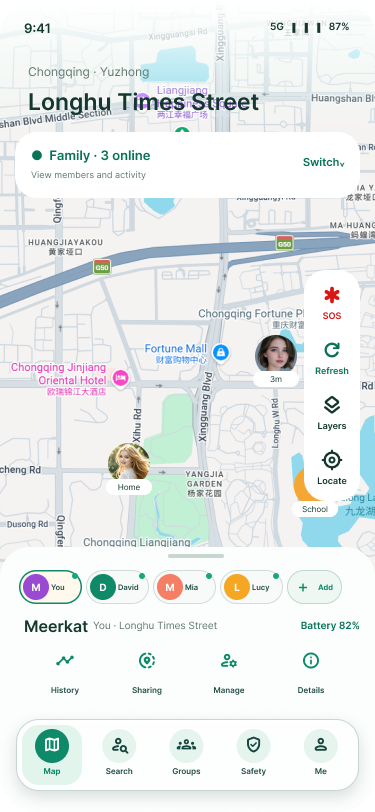
Family map showing shared locations
Your family circle

One map.
Many ways to connect.

Make room for
your people.

Create a private family group. Invite someone with a code or let them scan your invitation in person.

How invitations work ↗
Inside your family map.

Take a look at the details that help you decide when to check in.
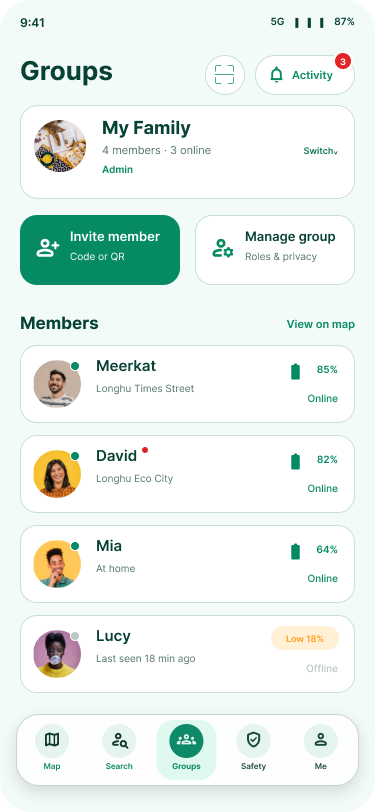
Invite your circle

Open Groups, choose Invite member and send the code to someone you trust. When you’re together, they can scan the QR card instead. Once they join, their name appears in Members.

Read a map update

Choose a family member to see the place and battery level shown on their card. Check the update time before heading out. An offline phone can still show its last shared location.

Review a safety alert

Open Safety to see recent alerts. A low-battery notice can explain why someone might stop updating. For a familiar place such as home or school, open Safe zones to review your saved places.

Groups screen
The family list shows who has joined your group.
✧

Check in with family.

Open a family member’s card to send an emoji or a voice note. A small hello can go a long way.

⌖

Choose who can see you.

Manage your location sharing in family settings and pause sharing when you need some time to yourself.

Location sharing help ↗

Questions about sharing?

Find instructions for permissions, map updates and managing your account.

Visit support ↗